MapUI empower developers to embed advanced mapping and location services into their applications. From displaying interactive maps to generating routes, searching for places, and analyzing geospatial data, MapUI delivers a comprehensive toolkit designed to simplify integration and improve user experience.
To begin using MapUI APIs, simply create your account on our cloud platform. After setup, generate your API credentials including the API key and client secrets. Once ready, explore the available endpoints, review the authentication details, and start sending requests with your credentials.
The documentation is structured to guide you step by step:
The reference section provides everything a developer needs: detailed endpoint documentation, code samples in multiple languages, error codes with explanations, and a playground to test requests before using them in production.
Our team is available to assist you in case of questions or technical challenges. Simply reach out through the support section provided in the platform.
By accessing and using MapUI APIs, you agree to comply with the usage terms and conditions outlined for the platform.
MapUI's authentication system ensures that only trusted users and applications can access its APIs. This process safeguards sensitive data and guarantees that every request is verified before being processed.
MapUI APIs allow two secure methods of authentication:
To begin using MapUI’s APIs, follow these steps:
You can create new credentials directly from the MapUI Developer Console. The process is straightforward:
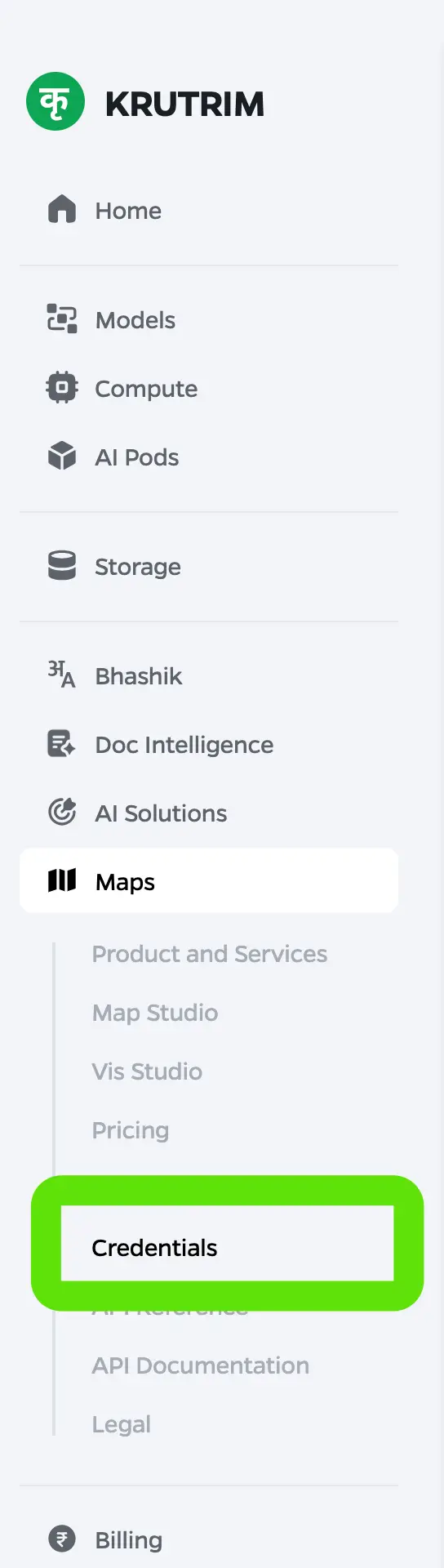
Click the "New Credentials" button on the top-right corner to start.
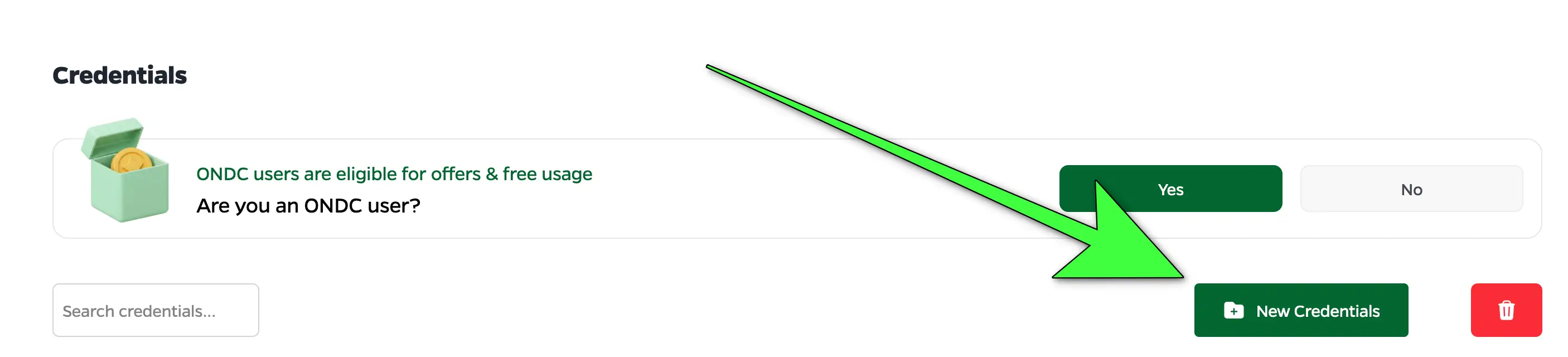
Provide a meaningful name and description for your new credential.
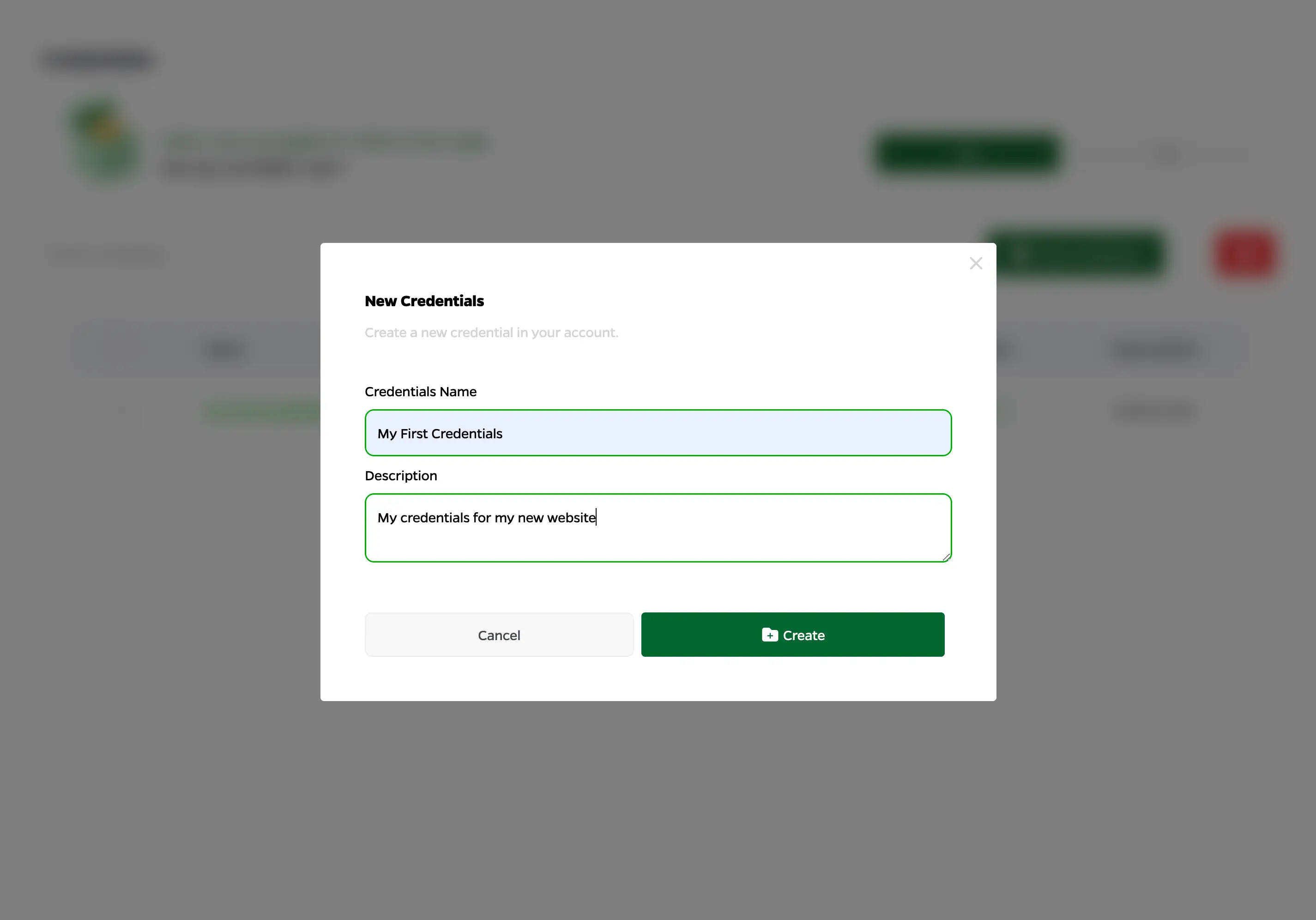
Your new credential will now appear in the credentials table.
Click the credential name to view its details. Both the API Key and OAuth2 client details will be available here.
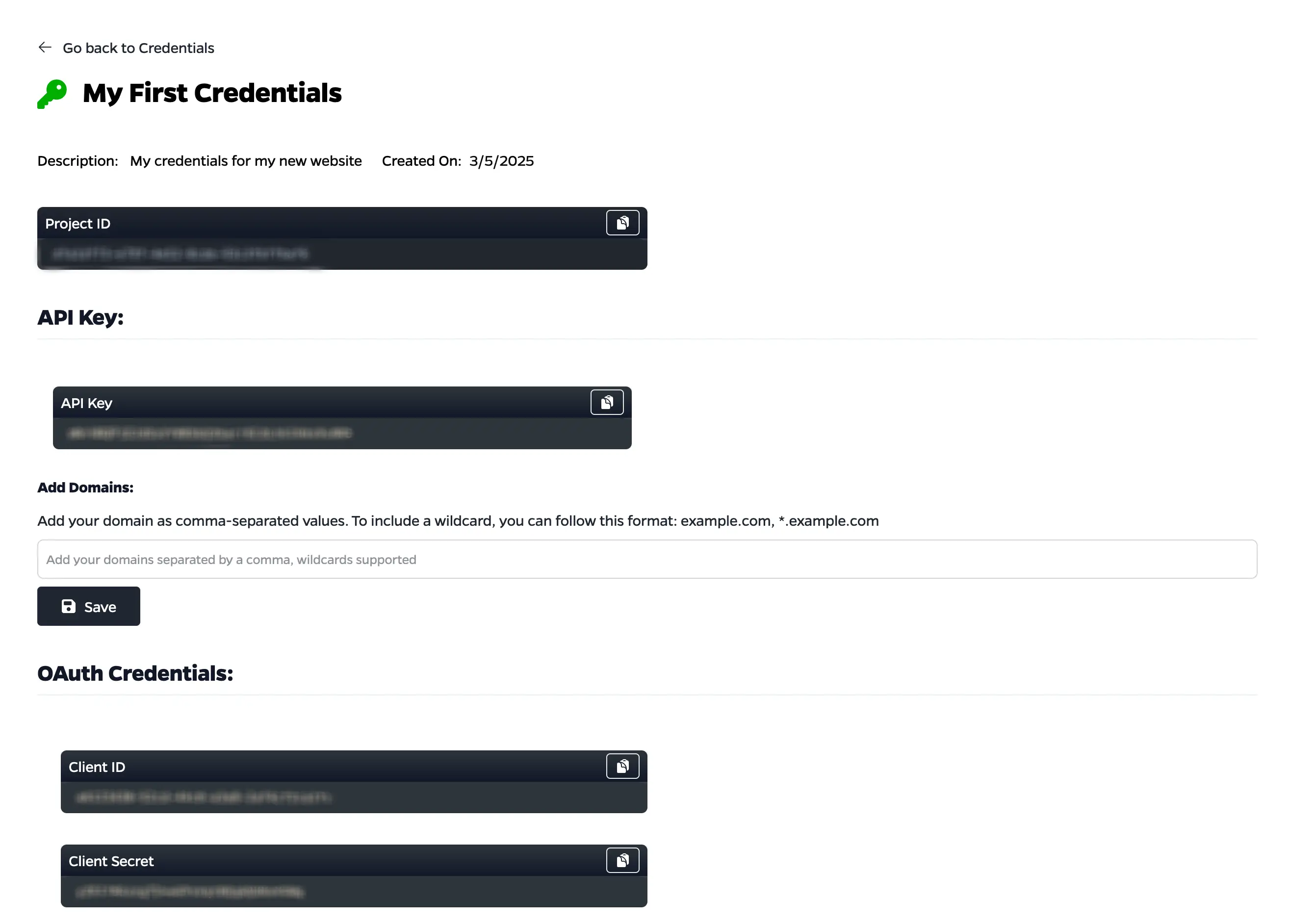
Enter one or more domains (comma-separated) and click "Add" to whitelist them for this credential.

You can request an access token from MapUI’s authentication service. Once retrieved, include the token as a bearer token in your API requests.
Authorization header format:
{ Authorization: 'Bearer <YOUR_ACCESS_TOKEN>' }Example BASH script:
clientId="client_id"
clientSecret="client_secret"

accessToken=$(
  curl --silent --request POST \
  --data "grant_type=client_credentials" \
  --data "scope=openid" \
  --data "client_id=${clientId}" \
  --data "client_secret=${clientSecret}" | jq -r '.access_token'
)

echo "Access Token: ${accessToken}"

curl --silent \
--header "Authorization: Bearer ${accessToken}" \
--location "https://mapui.example.com/places/v1/autocomplete?input=${searchText}" | jqAlternatively, you can attach your API Key directly as a query parameter to the request.
Example format:
https://mapui.example.com/<endpoint>?api_key=<YOUR_API_KEY>Example BASH script:
searchText="Taj%20Mahal"
apiKey="api_key"

curl --location "https://mapui.example.com/places/v1/autocomplete?input=${searchText}&api_key=${apiKey}"The MapUI Directions API enables developers to integrate reliable routing and navigation features directly into their applications. It supports multiple waypoints, alternative routes, and traffic-aware navigation, helping users plan efficient journeys whether in busy cities or long-distance routes.
MapUI Directions API considers real-time traffic conditions to deliver the most efficient path. It can calculate routes between two or more points, provide alternatives, and allow developers to customize results with overview parameters for summary or detailed routes.
The API solves the challenge of finding the best route between locations. With accurate distance and duration estimates, it is essential for ride-hailing, food delivery, courier, and logistics services to reduce travel time and improve customer experience.
You can make requests by passing your origin, destination, and API key. Below are examples for basic routing and routing with waypoints.
BASH
curl --location --request POST \
"https://api.mapui.io/routing/v1/directions?origin=LAT1,LONG1&destination=LAT2,LONG2&api_key=${your_api_key}" \
--header "X-Request-Id: YOUR_ID"
BASH
curl --location --request POST \
"https://api.mapui.io/routing/v1/directions?origin=LAT1,LONG1&destination=LAT2,LONG2&waypoints=LAT3,LONG3&api_key=${your_api_key}" \
--header "X-Request-Id: YOUR_ID"
For more details and advanced usage, refer to the MapUI API Documentation.
The MapUI Directions Basic API provides a simplified way to integrate routing into your applications. It generates clear routes and estimated travel times between multiple waypoints, ensuring accurate turn-by-turn navigation. Unlike the advanced version, it does not include live traffic data, but it remains reliable for everyday travel and multi-stop planning.
Designed for straightforward routing needs, this API calculates precise paths between two or more points and provides step-by-step instructions. It supports multi-waypoint journeys, gives estimated arrival times under standard conditions, and is easy to set up and customize for different applications.
The Directions Basic API is ideal for commuting, delivery routes, service visits, and general trip planning. By simplifying route generation without traffic complexity, it allows businesses and individuals to plan multiple stops efficiently while ensuring smooth navigation.
You can make a request by specifying your origin, destination, and API key. Below are examples for a basic request and one with waypoints.
BASH
curl --location --request POST \
"https://api.mapui.io/routing/v1/directions/basic?origin=LAT1,LONG1&destination=LAT2,LONG2&api_key=${your_api_key}" \
--header "X-Request-Id: YOUR_ID"
BASH
curl --location --request POST \
"https://api.mapui.io/routing/v1/directions/basic?origin=LAT1,LONG1&destination=LAT2,LONG2&waypoints=LAT3,LONG3&api_key=${your_api_key}" \
--header "X-Request-Id: YOUR_ID"
For more details and advanced setup, please refer to the official MapUI API documentation.
The MapUI Distance Matrix API helps you calculate accurate distances and estimated travel times (ETAs) between multiple origins and destinations. It is designed to optimize operations for logistics, ride-hailing, delivery, and other services that depend on precise routing and time efficiency.
This API goes beyond simple distance calculations by considering routable paths and traffic-aware travel times. It’s especially valuable when matching jobs with nearby drivers, engineers, or couriers to reduce delays and improve resource allocation.
The Distance Matrix API is ideal for businesses that need to compare multiple routes simultaneously. Whether it’s food delivery, courier networks, or field service planning, the API helps in finding the most time and distance-efficient assignments across multiple locations.
You can request a distance matrix by passing multiple origins and destinations along with your API key. Below is an example request:
BASH
curl --location --request GET \
"https://api.mapui.io/routing/v1/distanceMatrix?origins=LAT1,LONG1|LAT2,LONG2&destinations=LAT3,LONG3|LAT4,LONG4&api_key=${your_api_key}" \
--header "X-Request-Id: YOUR_ID"
For extended configuration and best practices, please refer to the official MapUI API documentation.
The Distance Matrix Basic API helps you calculate accurate distances and estimated travel times between multiple points. It is designed for applications that require precise route planning, job assignments, and scheduling without the need for real-time traffic data. With seamless integration, it improves operational efficiency and enhances user experience.
This API is ideal for scenarios where reliable ETAs and distance data are required under standard conditions. It enables businesses to plan routes, assign jobs, and schedule tasks efficiently while keeping the integration process simple.
BASH
curl --location --request GET "https://api.olamaps.io/routing/v1/distanceMatrix/basic?origins=12.931627594462489%2C77.61594443652996%7C12.94526954617208%2C77.63695879085383&destinations=12.92526954617208%2C77.63695879085383%7C12.961627594462489%2C77.61594443652996&api_key=${your_api_key}" --header "X-Request-Id: XXX"
Refer to the API documentation for more details.
The Snap To Road API aligns a series of geographic points to the nearest routable road segments. It ensures paths accurately follow the actual road network, preserving point order and optionally adding intermediate points for a more realistic route representation.
This API is essential when applications need precise mapping of sequential GPS points onto real roads. It is particularly useful for navigation, route optimization, and accurately tracking actual travel paths instead of raw point-to-point data.
BASH
curl --location --request GET "https://api.olamaps.io/routing/v1/snapToRoad?points=12.99927894246456%2C77.67323803525812%7C12.992086564113583%2C77.65899014102202%7C12.992567456375086%2C77.65989136324778%7C12.992672238708593%2C77.64337109685341%7C12.99127113597667%2C77.65716623889841&enhancePath=false&api_key=${your_api_key}" \
--header "X-Request-Id: XXX"
Refer to the API documentation for complete details.
The Nearest Roads API maps multiple geographic points to their closest road segments, without requiring them to form a continuous path. It ensures accurate road alignment for scattered points, making it highly useful for geocoding and location-based applications.
This API is ideal for scenarios where you want to match points to roads without considering route continuity. It helps improve accuracy in geospatial applications, enhances mapping services, and supports better decision-making for urban and location-based systems.
BASH
curl --location --request GET "https://api.olamaps.io/routing/v1/nearestRoads?points=12.935292984003528,77.66385210965773&radius=100&api_key=${your_api_key}" \
--header "X-Request-Id: XXX"
Refer to the API documentation for complete details.
The Speed Limits API provides accurate speed limit information for specific road segments based on latitude and longitude coordinates. It maps each point to the correct road and returns the applicable speed limit, ensuring reliable data for navigation, fleet management, and road safety applications.
Access to up-to-date speed limit data is essential for safe and efficient transportation. This API helps optimize routes, improve compliance with road safety standards, and reduce risks by ensuring vehicles stay within legal limits. It can also alert drivers to speed changes or over-speeding conditions in real time.
BASH
curl --location --request GET "https://api.olamaps.io/routing/v1/speedLimits?points=13.0630227,77.5930842|13.063479498221085,77.59321523175956&snapStrategy=snaptoroad&api_key=${your_api_key}" \
--header "X-Request-Id: XXX"
Refer to the API documentation for complete details.
The Autocomplete API enhances search functionality by providing real-time location suggestions as users type. It helps reduce errors from misspellings, speeds up searches, and ensures users quickly find relevant places such as restaurants, airports, landmarks, or EV charging stations.
Searching for places can be complex due to spelling variations or incomplete inputs. The Autocomplete API intelligently predicts and suggests accurate results, ensuring faster and more reliable searches. It creates a smooth user experience by reducing effort and providing relevant results instantly.
BASH
curl --location "https://api.mapui.io/places/v1/autocomplete?input=kempe&api_key=${your_api_key}" \
--header "X-Request-Id: XXX"
Use a debounce function when calling the Autocomplete API to avoid multiple requests while the user is typing.
BASH
curl --location "https://api.mapui.io/places/v1/autocomplete?location=19.265980587014074,72.96698942923868&input=landmark&api_key=${your_api_key}" \
--header "X-Request-Id: XXX"
Refer to the API documentation for more details.
The Place Details API provides rich and comprehensive information about a specific location using its unique Place ID. It returns details such as address components, geographic coordinates, categories, and additional attributes that help identify the place.
This API is essential for applications that need in-depth place insights, such as address details, business hours, and relevant metadata. It enables developers to deliver accurate and reliable location-based experiences.
Here’s a sample request to fetch details for a place:
curl --location "https://api.mapui.io/places/v1/details?place_id=mapui-platform:xxxxx&api_key=${your_api_key}" \
--header "X-Request-Id: YOUR_REQUEST_ID"
For full implementation details and parameter options, please refer to the official API documentation.
The Advance Place Details API allows developers to gather in-depth insights about a specific location using its unique Place ID. Along with the basic address and coordinates, it provides additional attributes like business categories, operational timings, ratings, and photos that help enrich applications with more contextual information.
This API is designed for scenarios where simple location data is not enough. By offering extended details such as customer reviews, photos, and operating hours, it becomes essential for apps that aim to provide accurate, engaging, and trustworthy information about places.
Below is a sample request showing how to fetch advanced place details using MapUI:
curl --location "https://api.mapui.io/places/v1/details/advanced?place_id=mapui-platform:xxxxx&api_key=${your_api_key}" \
--header "X-Request-Id: YOUR_REQUEST_ID"
More information, including optional fields and response examples, can be found in the API documentation.
The Nearby Search API helps users discover places of interest close to a given latitude and longitude. From restaurants and hotels to parks and service centers, this API makes it simple to deliver location-based recommendations within your application.
Many applications today rely on location intelligence to improve user experience. With the ability to filter results by category and proximity, the Nearby Search API is a must-have for travel apps, delivery platforms, local business listings, and more.
curl --location "https://api.mapui.io/places/v1/nearbysearch?layers=venue&types=restaurant&location=12.926585,77.502312&api_key=${your_api_key}" \
--header "X-Request-Id: YOUR_REQUEST_ID"
For detailed parameters and advanced filtering options, please refer to the full API documentation.
The Advanced Nearby Search API helps users discover detailed information about places near a given location. Beyond basic discovery, it provides enriched details such as contact numbers, opening hours, and other attributes, making it more powerful than a standard nearby search.
This API is ideal for apps that need not just a list of nearby places, but also in-depth details to help users make informed choices. From finding the right restaurant for dinner to selecting a venue for an event, the enriched data supports smarter decision-making.
curl --location "https://api.mapui.io/places/v1/nearbysearch/advanced?layers=venue&types=restaurant&location=12.926585,77.502312&api_key=${your_api_key}" \
--header "X-Request-Id: YOUR_REQUEST_ID"
For a full list of supported parameters and response fields, please refer to the official API documentation.
The Place Photo API allows developers to integrate high-quality images of locations directly into their applications. Instead of storing photos locally, you can retrieve them on demand using photo references provided by Place Details, Find Place, or Nearby Search results.
Visual context plays an important role in user experience. By using this API, apps can enrich place information with actual images—helping users recognize locations faster, explore nearby spots, or make better travel and shopping decisions.
curl --location "https://api.mapui.io/places/v1/photo?photo_reference=YOUR_PHOTO_REFERENCE&api_key=${your_api_key}" \
--header "X-Request-Id: YOUR_REQUEST_ID"
For more details on usage limits, image sizing options, and supported parameters, please refer to the official API documentation.
If you have any questions or need assistance with our APIs, please check our FAQ section or contact our support team.
MapUI collaborates with leading technology providers to deliver reliable, scalable, and future-ready location intelligence. Our strategic partnerships ensure seamless integration, advanced security, and enterprise-grade performance.